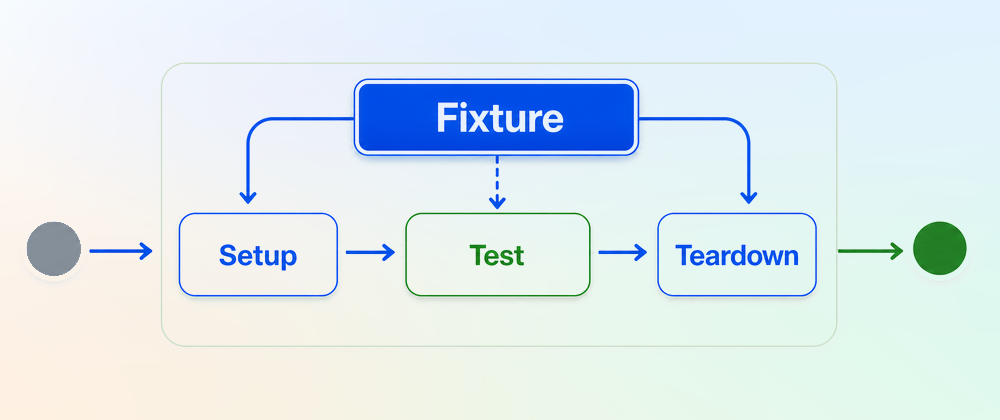
Playwright in Pictures is a series of articles where I use playwright-timeline-reporter to visualize different Playwright concepts with simple timeline charts.
Fixtures are a central part of the Playwright runner. They let you move setup and teardown code out of the test body, so the test itself stays focused on the behavior you want to check. You can think of fixtures as before/after hooks on steroids.
But fixtures also make test execution less explicit. Fixture code can run before a test, after a test, once per worker, or even without being named in the test. In this post, I’ll go through the main fixture patterns and show what each one looks like on a timeline.
Simple Fixture
Fixtures are declared with test.extend(). Here is an example of the fixture myTestFixture:
import { test as base } from '@playwright/test';
export const test = base.extend<{ myTestFixture: string }>({  myTestFixture: async ({}, use) => {    // fixture setup...    await use('fixture value');    // fixture teardown...  },});
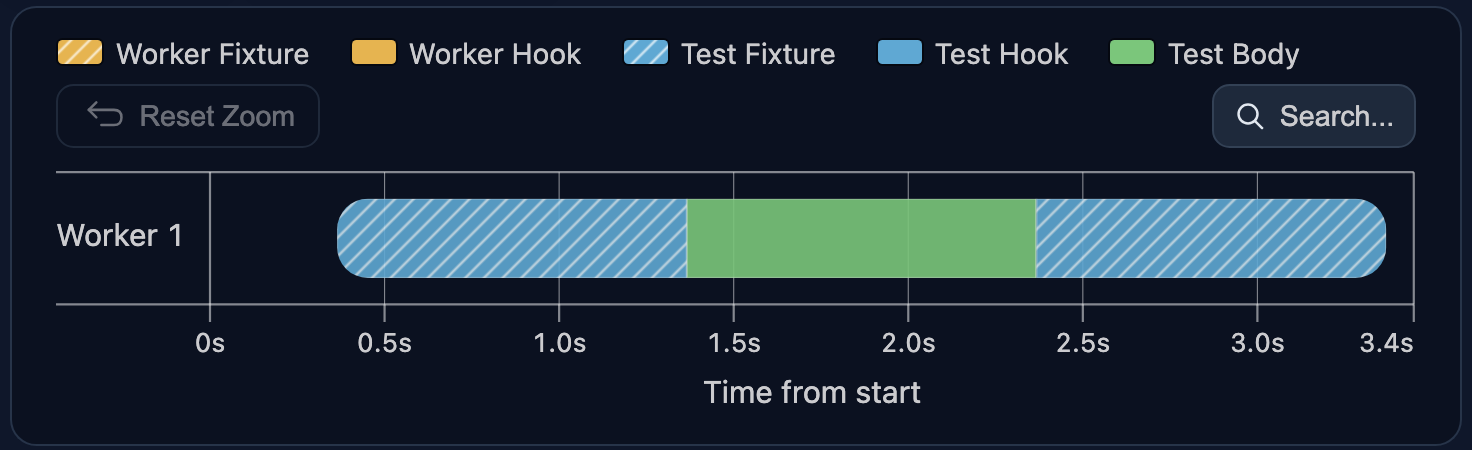
Fixtures are test-scoped by default. A test-scoped fixture runs for every test that uses it. Let’s use myTestFixture in a test:
import { test } from './fixtures';
test('test 1', async ({ myTestFixture }) => { // uses 'myTestFixture'  // ...});
Run the test:
npx playwright testPlaywright now sets up myTestFixture before the test and tears it down after it (blue bars):
Now add a second test that uses the same myTestFixture fixture:
test('test 1', async ({ myTestFixture }) => { // uses 'myTestFixture'  // ...});
test('test 2', async ({ myTestFixture }) => { // uses 'myTestFixture'  // ...});
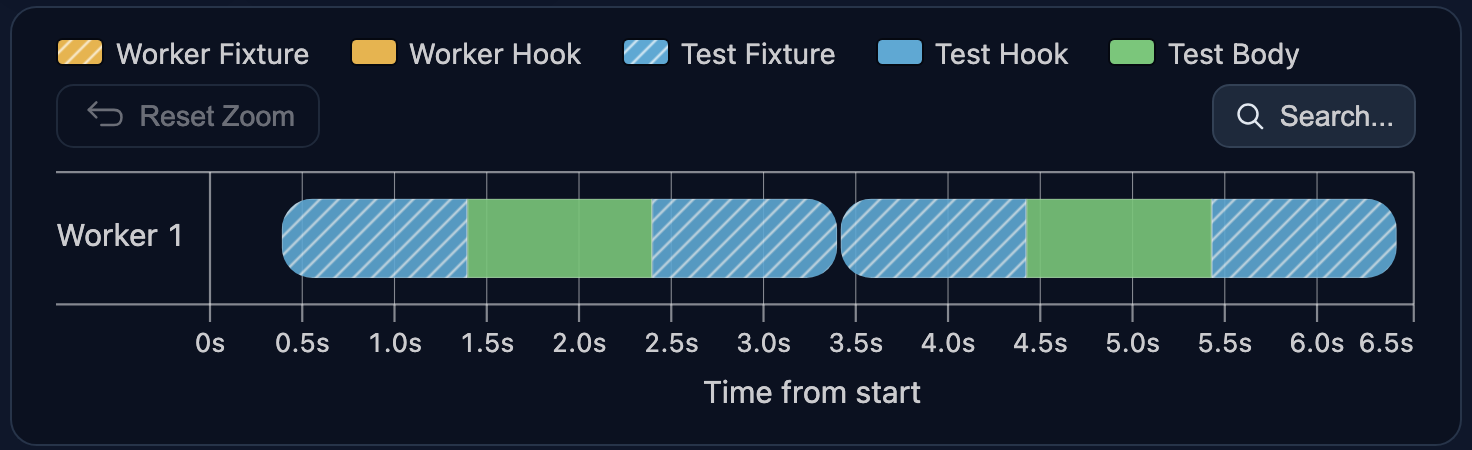
Because myTestFixture is test-scoped, Playwright creates a new instance for each test. The first instance is destroyed before the second one is created:
Fixtures Are Lazy
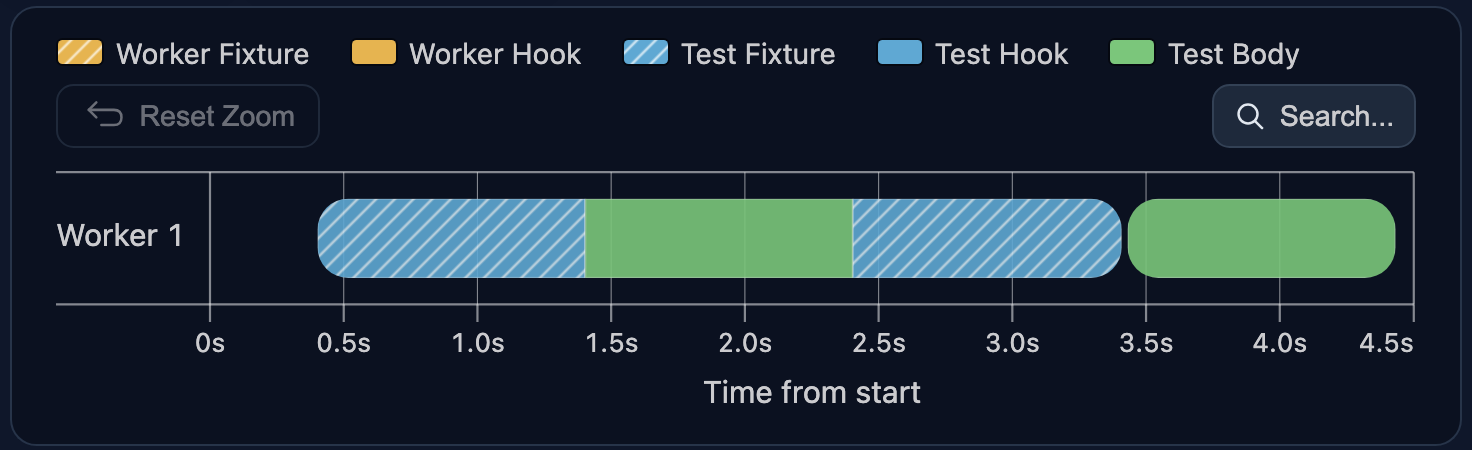
A fixture does not run just because it is declared. Playwright sets it up only when a test or another fixture asks for it.
Now remove myTestFixture from test 2 arguments:
test('test 1', async ({ myTestFixture }) => { // uses 'myTestFixture'  // ...});
test('test 2', async () => { // does not use 'myTestFixture'  // ...});
test 2 no longer requests myTestFixture, so Playwright does not set it up for that test. On the timeline, the blue fixture bar remains only around test 1:
Auto Fixtures
Sometimes a fixture should run for every test. You do not need to add it to every test signature. Mark it with { auto: true }:
import { test as base } from '@playwright/test';
export const test = base.extend<{ myTestFixture: string }>({  myTestFixture: [async ({}, use) => {    // fixture setup...    await use('fixture value');    // fixture teardown...  }, { auto: true }], // <-- make 'auto' fixture});
Now the test does not reference myTestFixture:
import { test } from './fixtures';
test('test 1', async () => {  // ...});
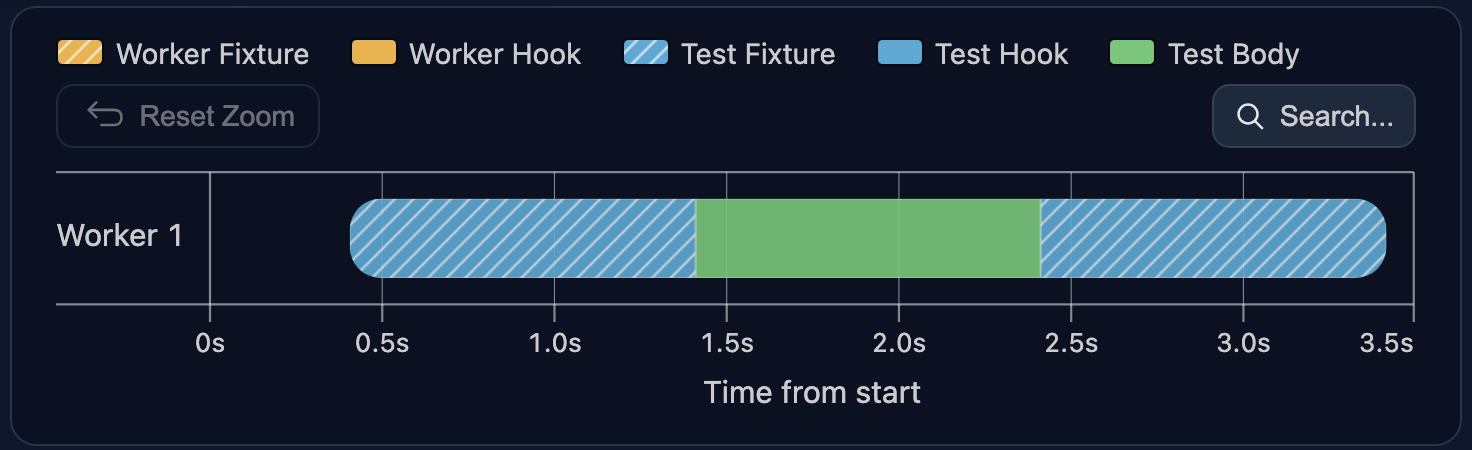
Playwright still runs the fixture because it is automatic:
Built-in Fixtures
Playwright also provides several fixtures out of the box. The most common one is page, which gives you access to a browser page:
import { test } from '@playwright/test';
test('test 1', async ({ page }) => {  // ...});
test('test 2', async ({ page }) => {  // ...});
After running these tests, the timeline shows page setup before each test (blue bars):
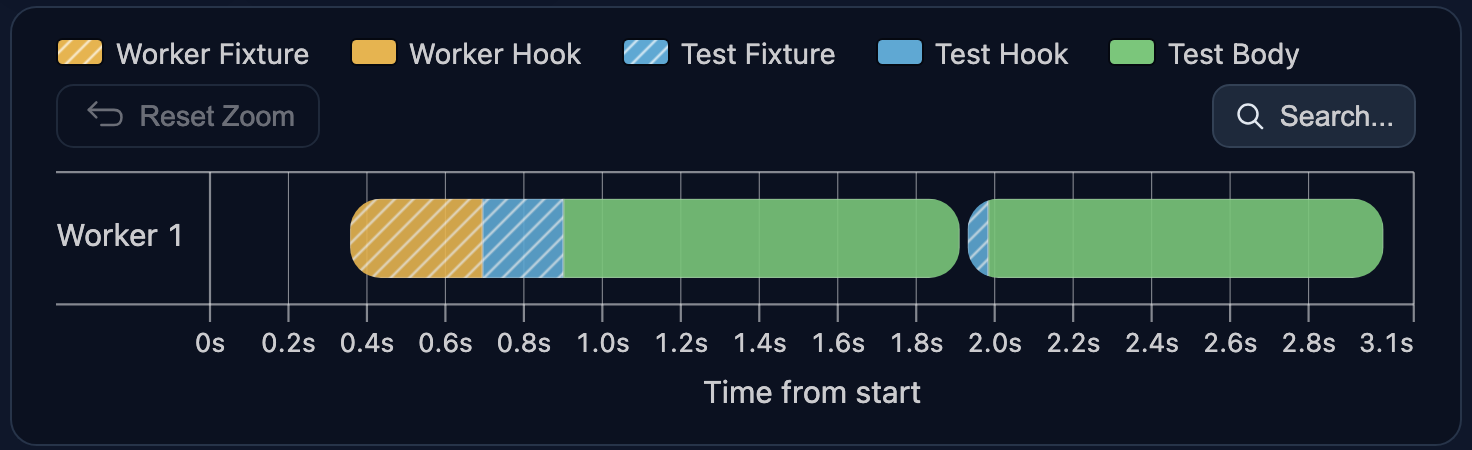
Two things stand out in this timeline:
- Besides the blue bars for the test-scoped
pagefixture, there is a yellow bar for the worker-scopedbrowserfixture. This is because thepagefixture depends on thebrowserfixture, so Playwright creates that dependency first. I’ll cover fixture dependencies and worker-scoped fixtures later. - The second
pagesetup is much shorter than the first. Playwright uses some internal optimization to set up subsequentpagefixtures.
Fixture Override
You can override any fixture with another test.extend() call. For example, this code overrides the built-in page fixture and adds custom setup and teardown around it:
import { test as base } from '@playwright/test';
export const test = base.extend({  page: async ({ page }, use) => {    // custom page setup...    await use(page);    // custom page teardown...  },});
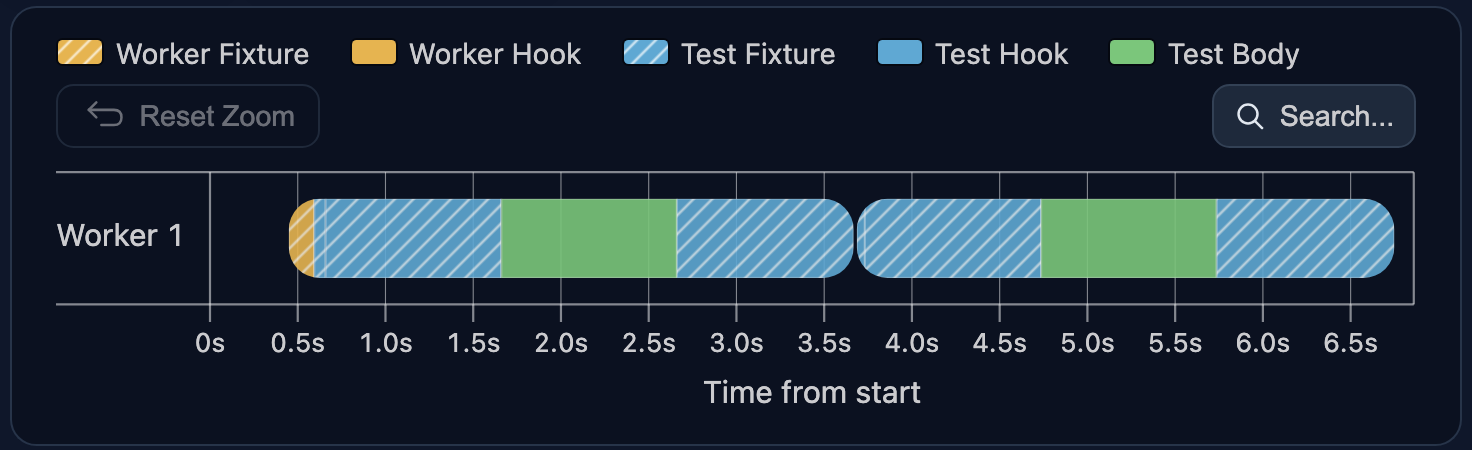
Notice the { page } dependency inside the override. This is the original Playwright page fixture. Playwright creates that original page first, then runs your wrapper around it.
The test still looks the same. It asks for page, and Playwright gives it the overridden version:
import { test } from './fixtures';
test('test 1', async ({ page }) => {  // ...});
test('test 2', async ({ page }) => {  // ...});
The timeline shows the wrapper around the original fixture:
Fixture Dependencies
Fixtures can also depend on other fixtures. In this example, fixtureC depends on fixtureA and fixtureB:
import { test as base } from '@playwright/test';
export const test = base.extend<{  fixtureA: string;  fixtureB: string;  fixtureC: string;}>({  fixtureA: async ({}, use) => {    // fixture A setup...    await use('A');    // fixture A teardown...  },  fixtureB: async ({}, use) => {    // fixture B setup...    await use('B');    // fixture B teardown...  },  fixtureC: async ({ fixtureA, fixtureB }, use) => {    // fixture C setup...    await use(`${fixtureA} - ${fixtureB} - C`);    // fixture C teardown...  },});
The test references only fixtureC:
import { test } from './fixtures';
test('test 1', async ({ fixtureC }) => {  // ...});
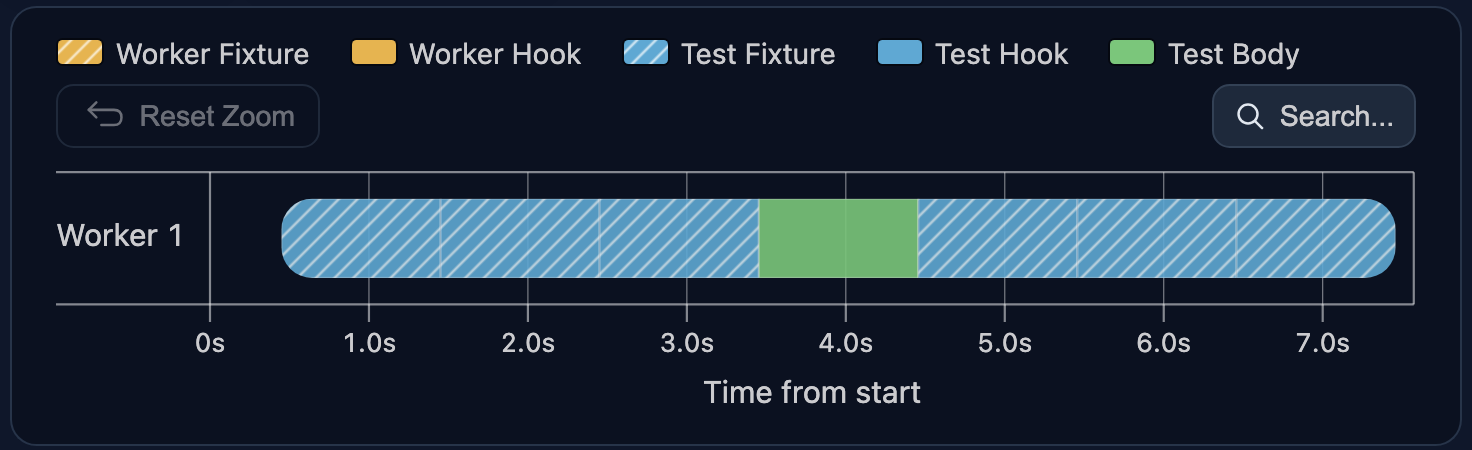
Playwright sees that fixtureC needs fixtureA and fixtureB, so it sets up both parent fixtures first. Teardown goes in the opposite order:
Worker Fixtures
When setup is expensive and can be shared between several tests, use a worker-scoped fixture instead of the default test-scoped. Define it in the same base.extend() call, but wrap the fixture function in an array with the { scope: 'worker' } option:
import { test as base } from '@playwright/test';
export const test = base.extend<{}, { myWorkerFixture: string }>({  myWorkerFixture: [async ({}, use) => {    // worker fixture setup...    await use('worker fixture value');    // worker fixture teardown...  }, { scope: 'worker' }],});
Now use the worker-scoped fixture in two tests:
import { test } from './fixtures';
test('test 1', async ({ myWorkerFixture }) => {  // ...});
test('test 2', async ({ myWorkerFixture }) => {  throw new Error('Intentional error');});
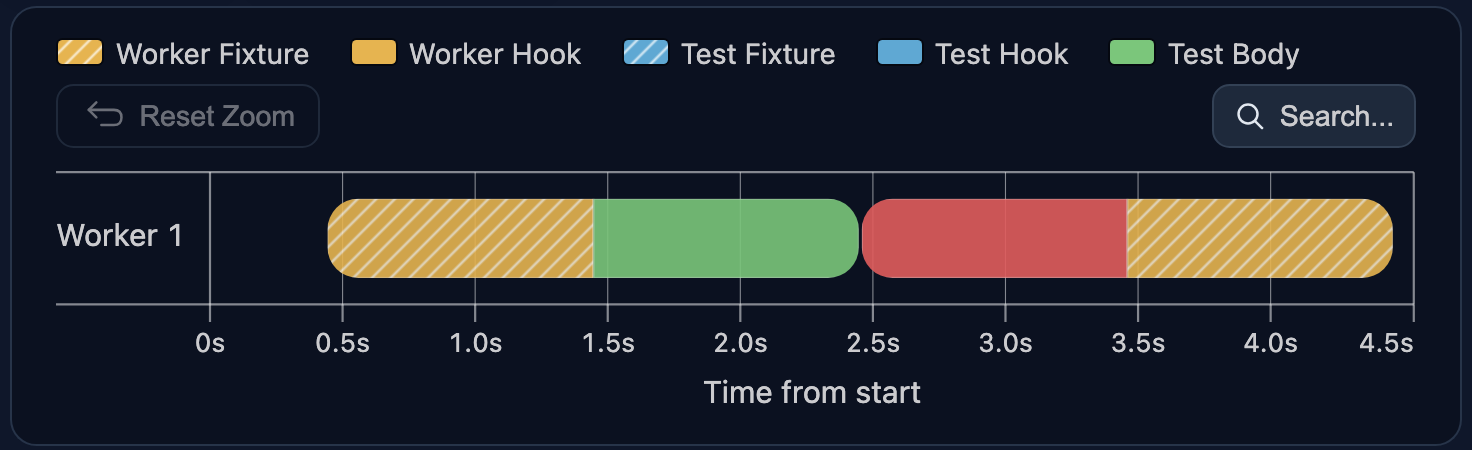
Both tests run in the same worker, so Playwright creates one myWorkerFixture instance and reuses it. There is no worker fixture setup between the two test bodies:
A small reporter detail: this demo intentionally fails
test 2so the report can show the worker fixture cleanup (right yellow bar). In a successful run, Playwright does not currently expose worker-fixture cleanup timing to the reporters API (see playwright#38350).This limitation affects only the report. Worker fixture setup and cleanup work the same way for passing and failing tests.
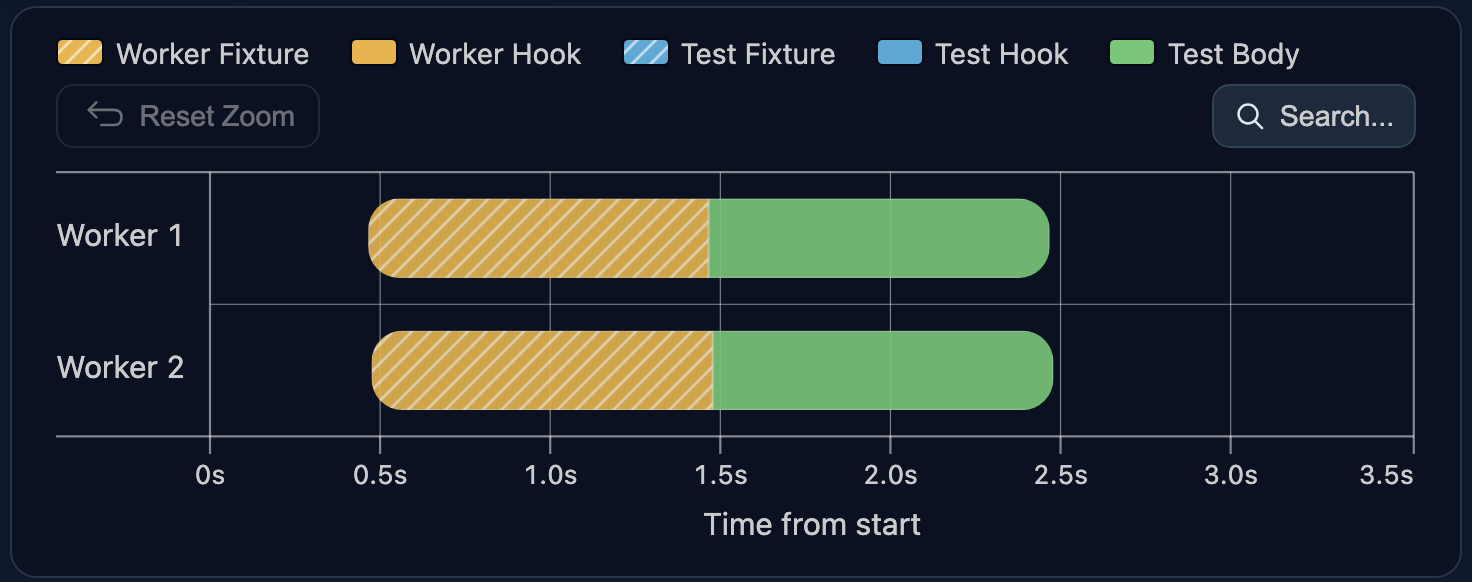
Worker-scoped means “once per worker”, not “once per test run”. To see the difference, split the two tests into separate files:
test('test 1', async ({ myWorkerFixture }) => { // ...});test('test 2', async ({ myWorkerFixture }) => { // ...});Run the files with two workers:
npx playwright test --workers 2With two workers, each file runs in a separate worker. Each worker gets its own myWorkerFixture, so the setup runs twice:
Putting It Together
You can combine multiple test-scoped and worker-scoped fixtures in the same test. Playwright initializes every required fixture and its dependencies in the correct order.
Here is one test-scoped fixture and one worker-scoped fixture declared together:
import { test as base } from '@playwright/test';
export const test = base.extend<  { myTestFixture: string },  { myWorkerFixture: string }>({  myTestFixture: async ({}, use) => {    // test fixture setup...    await use('fixture value');    // test fixture teardown...  },  myWorkerFixture: [async ({}, use) => {    // worker fixture setup...    await use('worker fixture value');    // worker fixture teardown...  }, { scope: 'worker' }],});
Use both fixtures in tests:
import { test } from './fixtures';
test('test 1', async ({ myTestFixture, myWorkerFixture }) => {  // ...});
test('test 2', async ({ myTestFixture, myWorkerFixture }) => {  // ...});
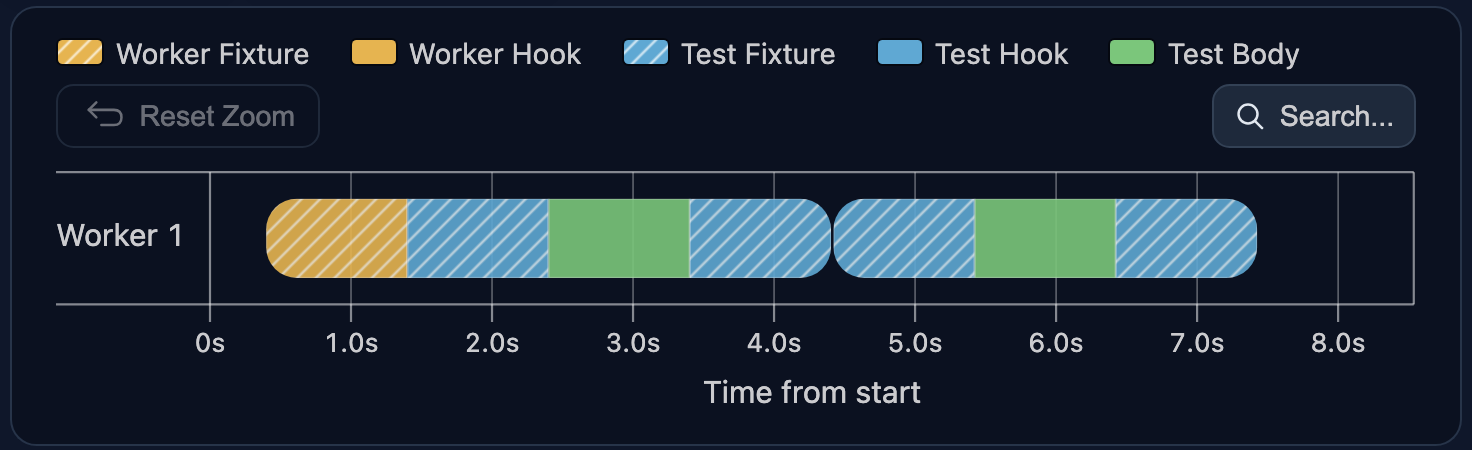
The timeline shows both scopes together. myTestFixture is initialized and removed for each test, while myWorkerFixture is created once for the worker and reused by both tests:
Conclusion
Fixtures are powerful, especially when you keep these principles in mind:
- Scope: per test or per worker?
- Check fixture dependencies and overrides.
- Track fixture durations: slow fixtures can significantly decrease performance.
Thanks for reading and happy testing ❤️
Further Reading
⬅️ Previous in series: Playwright in Pictures: Why Workers Restart?